UltimaForum

Wsparcie [VX] - Skrypt na pasek HP i mane.

HESEE - Pią 04 Mar, 2011 19:41
Temat postu: Skrypt na pasek HP i mane.
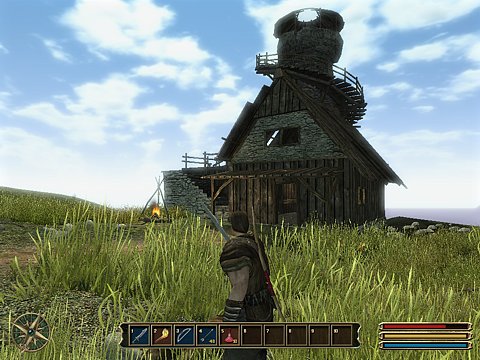
Czy potrafił by ktoś napisać takiego skrypta że życie i mana jest pokazywana jak w gothic 3?
Mile wdziane z grafiką.

Christo - Sob 05 Mar, 2011 07:29

Wyślesz screena z tego paska z Gothica 3?
HESEE - Sob 05 Mar, 2011 08:52


Valdali - Sob 05 Mar, 2011 10:18

nie widać :-(
HESEE - Sob 05 Mar, 2011 10:47

http://www.in4.pl/ima_rec..._screenshot.jpg
W prawym dolnym rogu.

Avara - Sob 05 Mar, 2011 10:54

I tak obrazek nie działa. Musisz go gdzie indziej wrzucić. Np. na http://imageshack.us/ .
HESEE - Sob 05 Mar, 2011 11:29

Działa http://www.dropmocks.com/mSAHV?
Jeśli żadne nie działa to http://www.google.pl/imag...iw=1280&bih=909
To jak zrobi ktoś takiego skrypta?

Ayene - Pon 28 Mar, 2011 09:02

Nie wiem, co mnie podkusiło, ale 'zrobiłam' ten skrypt:
Spoiler:

Kod:
# Jest to przerobiony skrypt HUD autorstwa SojaBird
# Dodana grafika pasków oraz poprawiony pasek z doświadczeniem.
# by Ayene

module HUD_HP_MP_EXP
  HUD_WIDTH = 152   # Szerokość okna
 
  ACTOR_ID = 0 # ID bohatera, którego statystyki mają się wyświetlać
               #(actor1=0, actor2=1...actorN=N-1)
 
  HIDE = true # Ukryj okno, gdy bohater jest za nim [true/false]
  OPACITY = 100 # Przezroczystość, gdy ukryty [0~255]
 
  HUD_START_DISPLAY = true # Wyświetlanie HUD od początku gry [true/false]
 
  CYCLE = false # Włącza / wyłącza zmianę bohaterów w drużynie za pomocą L&R
end

class Window_HUD_HP_MP_EXP < Window_Base
  include HUD_HP_MP_EXP
  attr_reader :index
 
  def initialize(index)
    @index = index
    height = 14 * 3 + 32
    super(544-HUD_WIDTH, 416-height, HUD_WIDTH, height)
    self.visible = $game_system.hud_display
    self.opacity = 0
    @actor = $game_party.members[@index]
    @width = HUD_WIDTH - 32
    hide_status
    refresh
  end
 
  def refresh
    contents.clear
    @hp = @actor.hp; @mp = @actor.mp; @exp = @actor.exp
    draw_actor_hp_HUD(@actor, 0, 14 * 0)
    draw_actor_mp_HUD(@actor, 0, 14 * 1)
    draw_actor_exp_HUD(@actor, 0, 14 * 2)
  end
 
  def hide_status
    if HIDE == true
      if $game_player.screen_x + 16 > self.x and
      $game_player.screen_y + 4 > self.y and
      $game_player.screen_x - 16 < self.x + self.width and
      $game_player.screen_y - 28 < self.y + self.height
        self.contents_opacity = OPACITY
      else
        self.contents_opacity = 255
      end
    end
  end
 
  def draw_actor_hp_HUD(actor, x, y, width = 104)
    bitmap = Cache.picture("hp_mp_bar")
    src_rect = Rect.new(0, 0, bitmap.width, bitmap.height)
    self.contents.blt(x, y, bitmap, src_rect)   
    gw = width * actor.hp / actor.maxhp
    gc1 = Color.new(130,24,27)
    gc2 = Color.new(180,37,41)
    self.contents.gradient_fill_rect(x+8, y+3, gw, 6, gc1, gc2)   
  end
 
  def draw_actor_mp_HUD(actor, x, y, width = 104)
    bitmap = Cache.picture("hp_mp_bar")
    src_rect = Rect.new(0, 0, bitmap.width, bitmap.height)
    self.contents.blt(x, y, bitmap, src_rect)   
    gw = width * actor.mp / actor.maxmp
    gc1 = Color.new(231,192,123)
    gc2 = Color.new(247,222,174)
    self.contents.gradient_fill_rect(x+8, y+3, gw, 6, gc1, gc2)   
  end
   
  def draw_actor_exp_HUD(actor, x, y, width = 104)
    bitmap = Cache.picture("hp_mp_bar")
    src_rect = Rect.new(0, 0, bitmap.width, bitmap.height)
    self.contents.blt(x, y, bitmap, src_rect)
    s1 = actor.gained_exp(actor.level, actor.exp)
    s2 = actor.needed_exp(actor.level)     
    gw = (s1 < s2 ? s1 * width / s2 : width)
    gc1 = Color.new(38,101,131)
    gc2 = Color.new(45,121,157)
    self.contents.gradient_fill_rect(x+8, y+3, gw, 6, gc1, gc2)   
  end
 
  def update
    self.visible = $game_system.hud_display
    return if !self.visible
    refresh if @hp != @actor.hp or @mp != @actor.mp or @exp != @actor.exp
    hide_status
  end
end

class Scene_Map < Scene_Base
  alias got_hud_start start
  alias got_hud_terminate terminate
  alias got_hud_update update
  def start
    got_hud_start
    @index = HUD_HP_MP_EXP::ACTOR_ID
    new_hud   
  end
  def terminate
    @got_hud.dispose
    got_hud_terminate
  end
  def update
    got_hud_update
    @got_hud.update
    return if !HUD_HP_MP_EXP::CYCLE
    return if !@got_hud.visible
    if Input.trigger?(Input::R)
      @index += 1
      @index %= $game_party.members.size
    elsif Input.trigger?(Input::L)
      @index += $game_party.members.size - 1
      @index %= $game_party.members.size
    end
    new_hud if @index != @got_hud.index
  end
 
  def new_hud
    @got_hud.dispose if !@got_hud.nil?
    @got_hud = Window_HUD_HP_MP_EXP.new(@index)
  end
end

class Game_System
  alias hud_initialize initialize
  attr_accessor :hud_display
  def initialize
    hud_initialize
    @hud_display = HUD_HP_MP_EXP::HUD_START_DISPLAY
  end
end

class Game_Actor < Game_Battler
  def gained_exp(current_level, current_exp)
    return (current_exp - @exp_list[current_level])   
  end
  def needed_exp(current_level)
    return (@exp_list[current_level + 1] - @exp_list[current_level])
  end
end


Wrzuć do folderu 'Graphics/Pictures' grafikę:

i nazwij ją 'hp_mp_bar'
Nie wiedziałam za bardzo, który pasek ma być czerwony, niebieski i żółty, w razie czego można to łatwo zmienić.
Całość wygląda tak:
Spoiler:


Flanagan - Pon 28 Mar, 2011 10:52

przyda mi się bardzo ładny skrypt. :przytul:
krakoman - Wto 29 Mar, 2011 07:00

Mi też się przyda :lol:
Azux - Wto 29 Mar, 2011 13:12

hmm..moze ktos mi pomuc poniewaz wszystko dziala mi ale po walce mimo iz ie uzywalem mp pasek ten spadl (zolty bo zakladam ze niebieski w tym przypadku to jest dos )

Teraz zauwazylem ze pasek mp jest odczytywany tak samo jak hp czyli poprostu sa 2 paski hp
ok w 70 linijce trzeba zamienic z

Cytat:
gw = width * actor.hp / actor.maxhp

na

Cytat:
gw = width * actor.mp / actor.maxmp


Powered by phpBB modified by Przemo © 2003 phpBB Group